QoderWork - A desktop AI agent and toolset launched by Alibaba's Qoder team.
QoderWork is a desktop AI agent launched by Alibaba's Qoder team, aiming to be a "local AI assistant that everyone can use." It encapsulates large models, agent frameworks, MCP toolsets, and customizable skills into a single macOS application. Users can drive it to complete complex tasks in a local sandbox using a single sentence in natural language, without needing to upload files to the cloud.
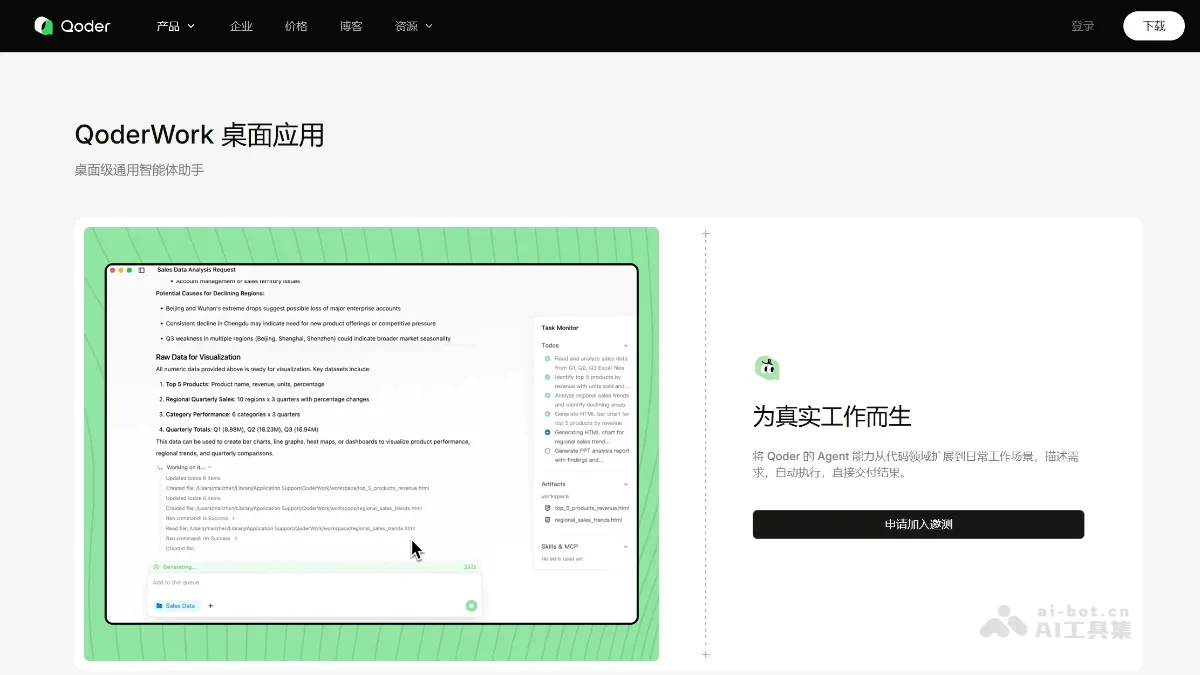
QoderWork is a desktop AI agent launched by Alibaba’s Qoder team, focusing on “a local AI assistant that everyone can use.” The large model, Agent framework, MCP tool set and customizable Skills are encapsulated into a macOS application. Users can drive it to complete complex tasks in the local sandbox with a sentence in natural language, without uploading files to the cloud. Common scenarios include: Excel cleaning to generate charts and output PPT reports, interview recordings to multi-platform copywriting, network crawling white papers to generate 10 pages of editable PPT, batch renaming/deduplication/classified downloads, etc. The entire task is executed locally, only the instructions are encrypted and uploaded to the cloud, and sensitive data does not leave the computer; it supports offline, and also supports community market installation or self-written Skills.
Main functions of QoderWork
- Local security execution : Tasks are completed in the computer sandbox, files do not need to be uploaded to the cloud, and sensitive data can be processed offline.
- One sentence automation : Give instructions directly using natural language, and the system will automatically break down the steps and call local applications (Excel, PPT, Photoshop, Notion, etc.) to complete the multi-step work.
- Data analysis and reporting : Automatically clean Excel, generate charts, and output editable reports or PPT, without manual operation in the entire process.
- Content generation with one click : Interview recordings are instantly transformed into video scripts, official account long articles, Xiaohongshu notes and subtitle files.
- market research : Grab the latest white paper online and automatically generate 10+ pages of editable PPT.
- File batch management : Rename, remove duplicates, classify, download and organize in one stop.
- Quick document compilation : Extract PDF metadata in batches and automatically generate references in APA and other formats.
- Skills Market : Encapsulate commonly used workflows into “skills” that can be reused with one click. It also supports community installation or self-written scripts.
How to use QoderWork
- Visit official website : Visit QoderWork’s official website https://qoder.com/qoderwork.
- Get installed : Apply for internal testing qualifications on the official website, receive the email to get the download link, drag it into Applications to start, the first startup will detect the local Office/WPS/browser and prompt for the authorization folder.
- Authorization file : Before any operation involving local files, a folder selection box pops up, only explicitly authorized directory access rights are obtained, and the session is automatically recycled.
- Give orders : Use natural language to describe requirements in the floating dialog box, such as “organize download folders and archive them by type” or “analyze this Excel to find the top five sales.”
- View plan : AI automatically generates a list of steps and expected results, which are first displayed to the user for confirmation. Steps can be added, deleted, or modified at this stage to avoid misoperations.
- Confirm execution : After clicking “Start”, the local sandbox runs. The interface displays the progress, calling applications and intermediate output in real time. The user can pause, continue or cancel at any time.
- Export results : After completion, you can preview/copy directly. It also supports one-click export to PPT, Word, PNG, ZIP, etc., or save to a designated cloud disk or Notion.
- Manage Skills : “Settings - Skills” in the lower left corner can turn on and off the built-in templates, you can also upload the community zip package or enter the install command to install a new Skill, which supports self-building.
- Models and Costs : Manually switch between “Lightweight/Standard/Large Model” on the taskbar. The lightweight 1×Credits is suitable for simple organization, and the large model 10×Credits is reserved for complex code reconstruction.
QoderWork application scenarios
- Organize files in seconds: When the download/desktop/project folder “explodes”, just “Archive by type” will automatically generate subdirectories such as “contracts, pictures, reports” and move the files. The whole process can be previewed and withdrawn..
- Thousands of levels of data perspective: 100,000 rows of CSV travel behavior data, summarized by attraction type, calculated male to female ratio and output in Excel + two-color bar chart in 30 seconds, same as end-of-month financial/operational reports.
- Sales Insights Quickly: Drag into the store sales table, automatically clean → Top5 products & declining areas → Line/column chart → PPT report with conclusions, originally 2 hours compressed to 5 minutes.
- Research reports are available with one click: Instruction “U.S. 2025-2026 Outdoor Products Market In-Depth Research” automatic chain search white paper → Extract scale, brand share, trends → Generate 12 pages of investor-grade PPT with detailed charts.
- Scientific research document manager: Drag in batches of PDFs, automatically extract the author, year, abstract, and keywords, and output the reference list according to APA/GB, which can be used directly when writing a review.
- Courseware/preaching crash course: Enter “Teaching PPT on the Principle of Refraction of Light” to instantly generate a complete courseware including knowledge points, cases, and interactive HTML animations, and the trainer will “hand rub” an open class in 10 minutes. ©
You May Also Like

Claude Sonnet 5 is about to be released! Performance may approach Opus 4.5, cost only half
Anthropic's Claude Sonnet 5 model is expected to be released soon. This news had already leaked last Sunday. GitHub AI engineer Dan McAteer posted on social media at the time: "Anthropic will release Claude Sonnet 5 this week, and says it could bring disruptive changes."

Are xAI and OpenAI going public? 2026 may be the year of AI IPOs
It's only the beginning of 2026, and Wall Street is already lining up with IPO prospectuses. In 2013, Musk stated that SpaceX would never go public, but recent news indicates he's combining rockets and AI; SpaceX and xAI plan to merge and go public this year. The IPO is expected to reach a valuation of $1.5 trillion. What made Musk suddenly change his mind?

FireRedASR2S - Xiaohongshu's open-source speech recognition model
FireRed ASR2S is a Super... on Xiaohongshu

InternVL-U - An open-source multimodal integrated model from Shanghai AI Lab and other sources
InternVL-U is a lightweight, unified multimodal model with 4B parameters, open-sourced by the Shanghai Artificial Intelligence Laboratory in collaboration with several top universities. It achieves an end-to-end closed loop of "understanding-reasoning-generation-editing" for the first time. The model employs three core designs: unified contextual modeling, modality-specific modularization, and decoupled visual representation, overcoming the bottlenecks of high training costs and uneven capabilities in traditional models. The model surpasses 14B-level models in complex scenarios such as text rendering, scientific reasoning, and spatial modeling. Its GenExam benchmark score of 22.9 for scientific image generation leads all open-source unified models, providing a significant advantage for scenarios such as scientific research and education, intelligent office work, and creative content creation.